
Compare free alternatives to your paid AI tools
Compare free options with what you already use, including limits, migration effort and reasons to keep the paid tool.
By Alan Brown
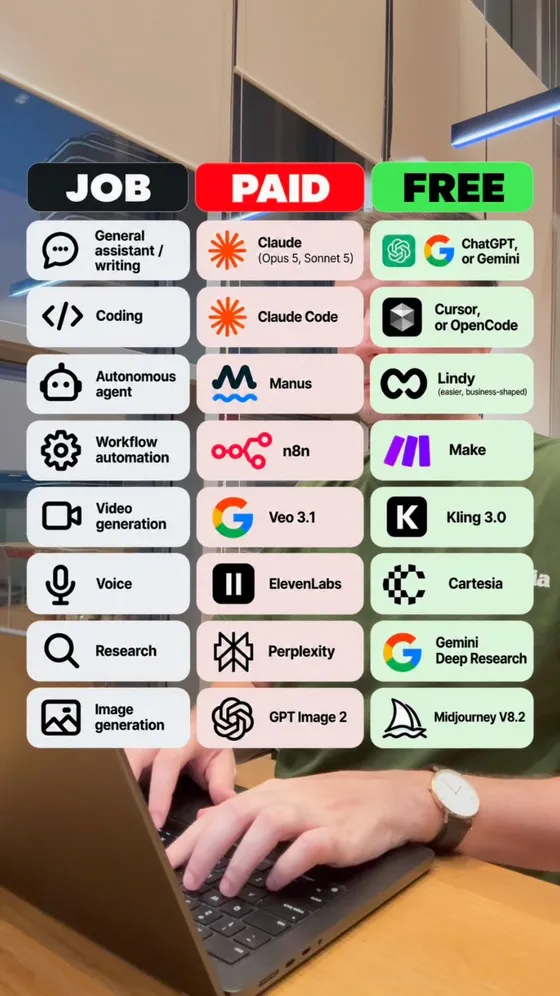
Three columns — the job, the paid tool everyone reaches for, and the free one that does the same work. Sorted by what you're trying to DO rather than dumped as a random list. The prompt below runs that table for your stack specifically: you name what you're paying for, it finds the free equivalents.
- 🧠 Sorted by job, not by name. A list of 100 tools alphabetically is unusable; a list grouped by what you'd reach for them to do is the difference between a bookmark and a decision.
- 🔎 Run it with web search ON. This is the one prompt on this page where that matters most — a model answering from training data will hand you tools that have shut down and free tiers that quietly became 14-day trials.
- 🎣 Free tier or free trial? The prompt asks for this explicitly because it's where the time goes. A tool that's free for 14 days is a paid tool with a delay, and it looks identical in every listicle.
- 🚧 The honest gaps matter more than the list. Asking it to say plainly when there's no real free equivalent is what stops it padding — and the tools with no free version are the ones actually worth your subscription.
- 🧾 Then check three. The last line of the prompt asks the model to flag its own uncertainty, which turns the output into something you verify rather than something you trust wholesale.
Context & limitations
The reason a generated list beats a saved one: any list of free AI tools is out of date the month after it's written. Free tiers get cut, tools get bought, pricing pages change quietly. A prompt you re-run against your own subscriptions survives all of that; a screenshot of somebody's top 100 does not.
And it answers the question that actually matters, which is not "what free tools exist" but "what am I paying for that I don't need to". Those are different lists, and only one of them saves you anything.
Do this yourself
A free licence and a free workflow are different; current limits and switching effort determine the useful comparison.
Want to build this with a teacher?
Pathwise Academy runs small, hands-on AI classes in Singapore for ages 10–17 and adults.